Showing posts with label SEO. Show all posts

How Add META TAGS to Blogger(blogspot) blogs

Adding meta tags you can get get more traffic from search engines like google,yahoo,msn,etc,especially the meta description is the most important one. How Add META TAGS to Blogger(blogspot) blogs
Meta tags are the tags which describes your site and tells the search engines what your site is all about.Adding meta tags is an important factor in SEO.(Search Engine Optimisation).Meta tags allows search engines to index your web pages more accurately. In other words,Meta tags communicate with the search engines and tells more information about your site and make it index correctly and accurately. How Add META TAGS to Blogger(blogspot) blogs
We must add two main meta tags to the head section of the template.One is the Meta description which describes your site and another one is Meta Keywords which tells about your site keywords(what your site is all about)
Here is how to add meta tags to your blogger(blogspot) blog: How Add META TAGS to Blogger(blogspot) blogs
1.Sign in to your blogger dashboard-->click the 'Layout' button[see the screenshot below] How Add META TAGS to Blogger(blogspot) blogs


2.Click on the 'Edit html' tab How Add META TAGS to Blogger(blogspot) blogs
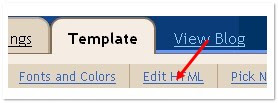

3.Find this code: How Add META TAGS to Blogger(blogspot) blogs
<b:include data='blog' name='all-head-content'/>

4.Now add below code just after the above code.Look at below: How Add META TAGS to Blogger(blogspot) blogs
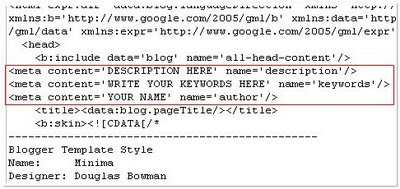
<meta content='DESCRIPTION HERE' name='description'/><meta content='KEYWORDS HERE' name='keywords'/><meta content='AUTHOR NAME HERE' name='author'/>

Replace, How Add META TAGS to Blogger(blogspot) blogs
DESCRIPTION HERE:Write your blog description
KEYWORDS:Write the keywords of your blog
AUTHOR NAME:Write the author's name(Your name) How Add META TAGS to Blogger(blogspot) blogs
Now save your template. How Add META TAGS to Blogger(blogspot) blogs

How To Add Different Meta Tags to Different Blogger Posts

What's the use of adding different meta descriptions to different Blogger Posts? How To Add Different Meta Tags to Different Blogger Posts
It is very good for SEO (Search Engine Optimisation) . Actually, why we are adding meta tags is to tell search engines what that page is all about... but, using same meta tags to all of your blog posts lessens the search engine rankings and traffic little bit. How To Add Different Meta Tags to Different Blogger Posts
But, if you add different unique meta tags to different Blog posts, it makes the search engines to know more about your individual blog posts and make them crawl and index your pages better and it also improves your Search engine rankings for sure ;)
So, how to add this? How To Add Different Meta Tags to Different Blogger Posts
For this to happen, you have to add some pieces of codes to the template.
First Sign in to Blogger dashboard » Layout » Edit html
and find this line How To Add Different Meta Tags to Different Blogger Posts

<b:include data='blog' name='all-head-content'/>

and add this code just below that line How To Add Different Meta Tags to Different Blogger Posts
<b:if cond='data:blog.url == "http://www.bloggertipandtrick.net/"'>

<meta content='DESCRIPTION' name='description'/><meta content='KEYWORDS' name='keywords'/>

</b:if>

Now we have added meta tags to the homepage.
Next, you want to add meta description for your blogger post, for example let see how to add meta tags to below post :

http://www.bloggertipandtrick.net/2009/03/how-to-add-paypal-donate-button-to-your.html

This is the way to add meta tags to above post: How To Add Different Meta Tags to Different Blogger Posts
<b:if cond='data:blog.url == "http://www.bloggertipandtrick.net/2009/03/how-to-add-paypal-donate-button-to-your.html"'>

<meta content='How to add Paypal Button to your Blogger Blog, Adding Donations to your blog' name='description'/>

<meta content='Adding,Paypal,Donate,Button' name='keywords'/>

</b:if>

Now, what you have to do is pasting the above code below the home page meta tags and changing the link,description and keywords.
So, the final code now looks something like: How To Add Different Meta Tags to Different Blogger Posts
<b:if cond='data:blog.url == "http://www.bloggertipandtrick.net/"'>

<meta content='DESCRIPTION' name='description'/><meta content='KEYWORDS' name='keywords'/>

</b:if>

<b:if cond='data:blog.url == "http://www.bloggertipandtrick.net/2009/03/how-to-add-paypal-donate-button-to-your.html"'>

<meta content='How to add Paypal Button to your Blogger Blog, Adding Donations to your blog' name='description'/>

<meta content='Adding,Paypal,Donate,Button' name='keywords'/>

</b:if>

Just like the above procedure, you can add different meta tags to as many blog posts as you can. How To Add Different Meta Tags to Different Blogger Posts

How To Add One Click Sitemaps Submitter to blogger

With this tool your visitors can directly notify Google, Yahoo!, Ask.com and Moreover.com about their new or updated sitemaps file. How To Add One Click Sitemaps Submitter to blogger
1.Login to your dashboard--> layout- ->Page Elements
2.Click on 'Add a Gadget' on the sidebar.
3.Select 'HTML/Javascript' and add the code given below and click save. How To Add One Click Sitemaps Submitter to blogger


<script src="http://www.mypagerank.net/services/sn/servicesn_js.php"></script

Now you are done.It will look like this. How To Add One Click Sitemaps Submitter to blogger

วิธีทำเว็บให้น่าใช้งาน SEO

วิธีทำเว็บให้น่าใช้งาน

หากคุณเป็นเจ้าของเว็บไซต์ วันนี้เรามีข้อควรระวังสำหรับเว็บไซต์บางส่วนของ Jacob Nielsen มาฝาก เพื่อให้คุณนำไปปรับและพัฒนาเว็บไซต์ของคุณให้ถูกใจยูสเซอร์ให้ดียิ่งๆขึ้นไป...ไปดูกันเลย
  1. Legibility Problems ความยุ่งยากในการอ่าน เนื่องจากบางเว็บใช้ฟอนต์ขนาดเล็กและไม่สามารถปรับขนาดได้สร้างปัญหาให้กับยูสเซอร์เป็นอย่างมาก
  2. Non-Standard Links ยูสเซอร์ส่วนมากแยกไม่ออกว่าเท็กซ์ตัวไหนบ้างที่เป็นลิงก์ ควรสร้างมาตรฐานให้ยูสเซอร์เข้าใจง่ายขึ้น เช่น ลิงก์ที่ดี ควรมีสีที่แตกต่างจากตัวคอนเทนต์ปกติ และอาจจะต้องมีเส้นใต้ขีดไว้เสมอ หรือการคลิกลิงก์เพื่อเปิดหน้าต่างใหม่ เหมาะใช้งานกับไฟล์ประเภท PDF และหน้าเว็บไซต์อื่นที่ไม่ใช่ในเว็บเดียวกัน
  3. Flash นำเสนอแฟลช ไปพร้อมกับการใส่ใจเนื้อหาและข้อมูลภายในเว็บไซต์ เพื่อเอื้อประโยชน์ซึ่งกันและกัน
  4. Bad Search หากเว็บของคุณมีปริมาณข้อมูลมากๆ และมีบริการค้นหาข้อมูล ก็ไม่ควารมองข้ามการปรับปรุงเสิร์ชเอนจินให้มีประสิทธิภาพเสมอ
  5. Browser Incompatibility ควรทดลองหน้าเว็บไซต์กับหลายๆบราวเซอร์ว่าใช้งานได้ถูกต้องหรือเปล่า
  6. Cumbersome Forms หากมีการใช้ฟอร์มในการกรอกแบบสอบถาม ไม่ควรยืดยาวจนเกินเหตุและควรจะมีตัวช่วยให้ยูสเซอร์กรอกได้สะดวก
  7. No Contact Information or Other Company Info ห้ามลืมข้อมูลในการติดต่อไม่ว่าจะเป็นเบอร์โทรศัพท์ หรืออีเมล์
  8. Frozen Layouts with Fixed Page Widths ควรออกแบบเว็บให้ปรับขนาดได้ตาม Resolution ของหน้าจอที่เปลี่ยนไป

7 ขั้นตอนง่ายๆ ที่จะทำให้ Search Engine Optimization หลงรักเว็บคุณ

7 ขั้นตอนง่ายๆ ที่จะทำให้ Search Engine Optimization หลงรักเว็บคุณ

คนถามเข้ามามากมายว่า "ทำอย่างไร ให้ Search Engine มองเห็นเว็บผมครับ?" หรือ บางคนก็ถามว่า "ทำอย่างไร ให้ Search Engine เข้าเว็บเราบ่อยๆคะ? ถึงขนาดมาทุกวันได้ยิ่งดี" บทความนี้จะไม่แค่ทำให้ Search Engine เข้าเว็บคุณบ่อยๆ แต่จะทำให้ Search Engine หลงรักเว็บคุณอย่างหัวปักหัวปำเลยทีเดียวผมจะเปรียบเทียบเหมือนกับเว็บคุณฝึกวิทยายุทธนะครับ ขั้นแรกก็ง่ายๆ ทานอาหารบำรุงร่างกายเว็บของคุณ ให้อิ่มหนำสำราญเสียก่อน โดยการ มี Link มาหาเว็บเราอย่างน้อย 1 Link (จากเว็บที่ google เห็นแล้ว) วิธีทำก็ง่ายๆ
  1. Submit Directory (Dmoz.org, sanook, pantip, thaiall ฯลฯ
  2. ขอแลก Link (ทำหน้าแลก Link โดยเฉพาะ จะดีมากต่อไปต้องทำให้ลมปราณในเว็บแข็งแกร่ง ด้วยการทำ Link Structure ภายในเว็บเราให้ดี นั่นก็คือ ทำให้ Search Engine (SE) เดินไปไหนมาไหนภายในเว็บเราได้สะดวก มีวิธีการดังนี้
  3. ทำให้ Link ภายในเว็บเชื่อมหากันได้ (ในสายตาของ SE) วิธีที่ชัวร์ที่สุด คือ Link ด้วย Text ธรรมดา ( Image Link, Flash Link, Image Map, Javascript SE ไม่ค่อยชอบถึงขั้นเกลียด เรียงจากน้อยไปมาก
  4. ถ้าเชื่อมกันไม่ได้ เพราะติดที่ Design ให้ทำหน้า Sitemap ขึ้นมาแล้ว Link ด้วย Text Link ธรรมดาก็พอครับต่อไปเป็นการฝึกวิทยายุทธครับ
  5. ใส่ Tag Title แต่ละหัวหลักของหน้านั้นๆ ถ้าหน้านั้นกล่าวถึงเรื่องอะไร ก็ใส่หัวข้อนั้นลง Title
  6. ต่อเนื่องจาก Tag Title ก็คือ ใส่ Meta Tag Description ด้วยคำอธิบายหัวข้อหลักในหน้านั้น ถ้าจะให้ดีให้นำมาจากข้อความที่อยู่แล้วในหน้านั้นครับ ส่วน Meta Tag Keyword ไม่จำเป็นเท่าไหร่ครับถ้าเป็น Programming ให้ระวังเรื่อง อักขระพิเศษ หรือ การปัดบรรทัดด้วย แก้ง่ายๆ โดยใส่ function (PHP) trim(), strip_tags, htmlspecialchars หรือ preg_replace เป็นต้นต่อไปเป็นการทบทวนวิทยายุทธอยู่เสมอ นั่นคือการ
  7. ทำเนื้อหา, เพิ่มหน้าให้เว็บคุณเรื่อยๆ ยิ่งเยอะยิ่งดี พยายามเพิ่มเนื้อหาบ่อยๆ พอเพิ่มทีก็กลับไปทำข้อ 3 ถึงข้อ 6 ทีหลักๆ ก็มีแค่นี้แหละครับ (เรียกง่ายๆ ว่านี่คือการ Thai SEO เบื้องต้น) ส่วนเรื่องการ Submit SE ถ้าทำให้ครบ 7 ข้อนี้ก็ไม่จำเป็นแล้วครับ แรกๆ Search Engine จะเริ่มเมียงๆเว็บคุณ จากนั้นก็จะมาถี่ขึ้นๆ ตอนหลัง เว็บคุณมีร่างกายแข็งแกร่ง บึกบึน มีวิทยายุทธสูงส่งแล้วละก็ สาวๆ Search Engine ทั้งหลายจะมารุมตอมเว็บคุณ จนหัวกระได (เว็บ) ไม่แห้ง สุดท้าย, ไม่นาน Search Engine จะหลงรักเว็บคุณเอง
ทั้งนี้ทั้งนั้น ต้องให้เวลาเป็นเครื่องพิสูจน์รักแท้ด้วยนะครับ ถ้าคุณทำบ่อยๆ สม่ำเสมอ ความรักของ Search Engine กับเว็บคุณก็จะยั่งยืน ตราบเท่าที่คุณยังทำตามวิธี 7 ข้อนี้ครับ

SEO (Search Engine Optimization)

SEO (Search Engine Optimization)

ขั้นตอนการทำ SEO ขั้นที่ 1 วิเคราะห์คู่แข่งและเลือกคีย์เวิร์ด ก่อนที่จะลงในเนื้อหา ขั้นตอนนี้ ผมจะพูดถึงเรื่อง SEO (Search Engine Optimization) กันก่อนนะครับ เผื่อมีบางคนหลงทางมาเจอ จะได้รู้ว่า SEO มันคืออะไร สำคัญยังไง ทำไมต้องทำ SEO ทำไมมีคนกล่าวถึงกันมากเหลือเกิน (ในกลุ่มเว็บมาสเตอร์และคนที่เป็นเจ้าของเว็บไซต์ต่างๆ) ก่อนอื่น ผมขอออกตัวก่อนนะครับว่า ผมไม่ได้เป็นเทพจุติจากที่ไหน แต่อาศัยว่ามีประสบการณ์ในการทำ SEO มาพอสมควร นอกจากนี้ ก็ยังได้ถ่ายทอดให้น้องๆ อีกหลายคนทำตาม และก็ประสบความสำเร็จมาแล้ว แต่ทั้งนี้ ก็ขึ้นอยู่กับความขยันของแต่ละคนอีกหล่ะครับ SEO มันไม่ได้เป็นกฏตายตัว (เราไม่ใช่กูเกิ้ล เอ็มเอสเอ็น หรือ ยาฮูนี่ครับ) มันมีการเปลี่ยนแปลงตลอดเวลา ใครขยันหาข้อมูล รู้จักสังเกต นำมาปรับแต่งก็ได้เปรียบหล่ะครับ

SEO คืออะไร SEO (เอสอีโอ) มาจากคำเต็มๆ ว่า Search Engine Optimization ความหมายแบบบ้านๆ ลูกทุ่งๆ ก็คือ การปรับแต่งเว็บไซต์ และกระบวนการต่างๆ ของเว็บไซต์ตั้งแต่การออกแบบ เขียนโปรแกรม และการโปรโมทเว็บ เพื่อให้ติดอันดับต้นๆ ของ Search Engine (เครื่องมือค้นหาเว็บไซต์ต่างๆ เช่น Google, MSN, Yahoo, AOL เป็นต้น)

SEO สำคัญยังไง อินเตอร์เน็ตในยุคปัจจุบันนี้ คนส่วนใหญ่ใช้ Search Engine ในการค้นหาข้อมูล แทนที่จะต้องพิมพ์ URL (Uniform Resource Locator) ก็ใช้ Keyword (คำค้น) ป้อนลงไปใน Search Engine Box ต่างๆ ก็จะค้นหาสิ่งที่ตัวเองต้องการได้อย่างง่ายดาย และตรงประเด็น มีให้เลือกเปรียบเทียบอีกหลายๆ แห่ง สำหรับเรื่องๆ นั้น และเมื่อค้นพบแล้ว ก็จะมีการแสดงผลออกมาหลายๆ หน้า หลายๆ เว็บไซต์ เว็บที่ถูกแสดงเป็นอันดับที่ 1 2 3 หรือที่แสดงผลในหน้าแรก ก็จะถูกคลิกเข้าไปดูข้อมูลมากที่สุด ด้วยเหตุนี้เอง เว็บไซต์ต่างๆ ย่อมต้องการให้เว็บตัวเองขึ้นอันดับ 1 ของ Keyword นั้นๆ เผื่อผลประโยชน์หลายๆ ด้านเช่น ขายสินค้า โฆษณา หรือโปรโมทร้านค้า บริษัทของตัวเอง ทำให้ได้เปรียบคู่แข่ง
  1. ทำให้เว็บของเราติดอันดับต้นๆ ในการแสดงผลงการค้นหา
  2. การเขียน Title ที่ดี Keyword Intrend ช่วยทำให้สะดุดตา แม้อันดับต่ำกว่า ก็มีสิทธิ์ถูกคลิกมากกว่า
  3. ทำให้เว็บเราถูกหลักของ W3C ซึ่งเป็นมาตรฐานของภาษาที่ใช้เขียนเว็บ ทำให้ดูสละสลวยเมื่อ Search Engine มาเจอก็เก็บข้อมูลต่างๆ ได้ง่าย
  4. เมื่อติดอันดับต้นๆ ทำให้ขายสินค้าได้ โฆษณาเข้ามา เพราะมีทราฟิก
  5. ติด Adsense ก็มีโอกาสที่จะได้รับเงินค่าโฆษณาที่สูงด้วย เพราะมีทราฟิกก็มีโอกาส

SEO เคล็ดลับ โปรโมท เว็บให้ดัง

เคล็ดลับ โปรโมท เว็บให้ดัง

1.ถ้าคุณเพิ่งทำเวบใหม่สดๆเลย ก็เขียนบทความอะไรซักหน่อย แล้วไปส่งที่ Digg, Reddit, และ Now Public
2.สร้าง Yahoo Group เกี่ยวกับเรื่องของเวบเรา
3.สมัคร MySpace แล้วใช้มันช่วยโปรโมท
4.บุ๊คมาร์คเวบเราที่ Del.icio.us และถ้าคุณมีกึ๋นซักหน่อยนะ ก็ใส่ปุ่ม Del.icio.us ไว้ในเวบของคุณด้วย
5.สมัคร Technorati แล้วก็ “claim” Blog ของคุณซะ (อย่าลืมใส่ปุ่ม ไว้ที่เวบ)
6. submit เวบของคุณที่ directories ที่เป็น seach engine friendly แบบฟรีๆ ก็มีเยอะแยะ เช่น Info Vilesilencer
7. ทำแบบสำรวจ นี่เป็นวิธีที่ดีที่จะโปรโมทแบบ offline (มีใครเคยทำมั้ยง่ะ - -a)
8. ไปลงโฆษณาฟรีสำหรับบริษัทของคุณที่ Gumtree
9. ใช้ RSS feeds
10. submit RSS feeds ของเราตาม FeedBurner, Squidoo, Feedboy, Jordomedia, FeedBomb, FeedCat, rssmad, feedirectory, และ Feedboy
11. เขียนบทความที่เกี่ยวกับเวบของคุณ แล้วส่งไปตาม article sites
12. สมัคร StumbleUpon แล้วเรียกเพื่อนๆมาช่วย Stumble
13. สร้างหน้า 404 ของตัวเองไว้ เผื่อว่าคนเข้ามาเจอ error ก็จะ redirect ไปที่อื่นๆที่ดีๆ
14. สร้าง 301 redirect เพื่อจะ redicrect traffic ของคุณจาก non-www มาที่ www ดูข้อมูลเพิ่มเติมได้ ที่นี่
15. ใส่ลิ้งของเวบคุณไว้ใน signature ของเวบบอร์ดที่คุณเป็นสมาชิก
16. บอกเพื่อนๆเกี่ยวกับเวบของคุณ (มันเป็นหารโฆษณาฟรีๆน่ะ)
17. ตรวจคำผิดในเวบของคุณด้วย!
18. เช็คเวบของคุณ browser หลายๆอัน
19. ซื้อโฮสต์ที่ดีพอ ไม่มีใครชอบเวบที่เป็นเต่าคลาน
20. ไม่ต้องกังวลกับ PageRank ไปหาทางโปรโมทดีกว่านะ เดี๋ยว PageRank มันก็ดีตามเอง
21. แจกของฟรี !! คนส่วนมากจะบอกต่อ เมื่อมีของฟรี
22. บอกเพื่อนบ้านของคุณ (- -a)
23. บอกวิธีที่จะติดต่อคุณให้มากที่สุด msn email yahoo skype เบอร์โทร ที่อยู่
24. ลงโฆษณากับ Craigslist มันฟรี และก็ดีใช้ได้
25. อย่าใช้ Frames
26. Submit เวบที่ DMOZ.org มันอาจจะต้องใช้เวลาซักหน่อย แต่ก็คุ้ม
27. สร้าง Site Map ให้กับเวบของคุณ แล้วส่งให้ Google
28. ทำเสื้อขึ้นสกรีน URL เวบคุณลงไป แล้วก้ใส่มันบ่อยๆด้วย (อืม..คิดได้เนอะ - -”)
29. เอาไปให้สาวสวยหุ่นเร้าใจใส่ด้วยซักตัว *-*
30. สมัคร Affiliate program เพื่อขายสินค้าของคุณ หรือว่าถ้าคุณเป็น Publisher ก็โกยเงินกัน!
31. ในหน้า contact ถามด้วยว่า คุณสนใจจะรับ Newsletter มั้ย
32. ส่ง Newsletter !!
33. เข้าร่วมสัมมนาคนทำเวบ คุณอาจจะเรียนรู้อะไรใหม่ๆก็ได้
34. หา Blog ดีๆ ดังๆ แล้วก็ไปตอบคอมเม้นไว้ (ใส่ลิ้งเวบคุณด้วยล่ะ)
35. อย่าจ้างคนให้ submit search engines ให้ เสียตังค์เปล่าๆ เพราะอันที่ดังๆมีแค่ Google 50% Yahoo 25% และ MSN 10%
36. ส่งคลิบเข้าพร้อมกับชื่อเวบคุณในคลิบ ที่ YouTube กับ Google Video
37. แจกฟรี e-book แล้วเวบคุณจะเป็นที่ฮือฮา
38. แจก WordPress Theme, Blogger Theme, หรือ phpLD themes
39. ถ้าคุณขายของที่มีโฆษณาในทีวี เขียนในเวบคุณด้วยว่า “แบบที่เห็นในทีวี”
40. หลีกเลี่ยงเทคโนโลยีที่ไฮโซเกิน เช่น Java หรือ Active x
41. แจกของให้โหลดได้ ระวังลิขสิทธิ์ด้วย
42. เรียนรู้ CSS
43. ตอบคอมเม้น ยิ่งถ้าเป็น Blog ตอบบ่อยๆ
44. ขอให้เวบอื่น หรือ Blogger คนอื่นๆ ช่วย review เวบคุณ หรือว่า สินค้าก็ได้ (แลกกัน review ก็ดี)
45. ใช้ชื่อ page ที่มีความหมาย ไม่ใช่ ไม่มีความหมาย
46. ถ้าคุณจำเป็นจะต้องมี Flash ที่หน้าแรก อย่าลืมใส่ปุ่ม skip ด้วย
47. บอกหนังสือพิมพ์ท้องถิ่น หรือ วารสารประจำโรงเรียนเกี่ยวกับเวบของคุณ บางทีถ้าเค้าไม่มีเรื่องจะเขียน หน้าของคุณอาจจะไปโผล่ในนั้นก็ได้
48. จงดังในหมู่คนที่เขียนเรื่องเดียวกัน
49. บริจาคเพื่อการกุศล แล้วส่วนมากเค้าจะใส่ลิ้งแบคให้คุณ
50. ปฏิบัติตามกฏของ W3C standards มันจะช่วยให้คุณอยู่รอดได้ในระยะยาว
51. ทีมกีฬาในโรงเรียน หรือในชุมชน ให้โอกาสคุณเป็น sponsors ในราคาถูกและดี
52. โปรโมทเวบตามบอร์ดต่างๆ แต่อย่าสแปม
53. ขอให้ Blogger เขียนเกี่ยวกับเวบของคุณ โดยแลกกับลิ้งแบค
54. จัดการประกวดแข่งขันขึ้นมาในเวบ
55. ใส่ปุ่ม “ส่งต่อให้เพื่อน”
56. มี site map ในเวบของคุณ เพื่อช่วยผู้เข้าชม และsearch engine
57. ตั้งชื่อที่มีคีย์เวิร์ดตรงๆ ทั้งผู้อ่านและ search engine ชอบ
58. ใส่ปุ่ม FeedBurner ในเวบด้วย คนอ่านจะได้สมัครได้ง่ายๆ
59. Adwords เป็นทางเลือกที่ดี ถ้าคุณใช้มันเป็น
60. ใส่ About Me ใน Blog ผู้อ่านจะรู้สึกว่ามี’คน’ที่กำลังสื่อสารกับเค้า
61. สร้างหน้าเวบ แบนเนอ และโลโก้ไว้บนเวบ เพื่อว่าใครจะเอาไปตีพิมพ์ หรือเอาไปแปะในเวบ
62. ใส่ลิ้งมาที่เวบคุณจาก ebay profile
63. ขอให้เพื่อนของคุณช่วยวิจารณ์เวบแบบตรงๆ
64. E-books ที่มี reseller rights เป็นของแจกที่ดีอย่างนึงสำหรับเวบคุณ
65. submit รูปที่ Flikr
66. แชร์ banner ที่ เวบแลกเปลี่ยน banner
67. ตอบอีเมลล์ของลูกค้าให้เร็ว ไม่มีใครชอบรอ 3-4 วันกว่าจะได้รับคำตอบ
68. Keep It Simple Stupid (KISS) ใช้ CSS ในการวาง layout และ html text อย่าลวดลายมาก
69. อย่าใส่รูปเยอะมากจนเกินไป จะทำให้โหลดช้า
70. ถ้าคุณคิดว่าจะ submit เยอะมากๆ สร้างเมลล์อันใหม่มาเพื่อการนี้ แล้วทิ้งมันไปซะเพื่อลดการ สแปม
71. ใส่ Favicon ให้เวบคุณ จะได้โดดเด่นเวลา Bookmark
72. เข้า Yahoo answer แล้วตอบคำถาม พร้อมกับใส่เวบของคุณเปน source
73. อย่าซื้อ traffic มันจะมาแค่วูบเดียว แล้วจากไป
74. ทำความรู้จักกับคนที่อยู่ในวงการเดียวกัน เข้า community เป็นต้น
75. เขียนบทความที่จะมีคนอยากลิ้งถึงมากๆ เช่น บทความนี้ไง

How To Boost Traffic To Your Blog: SEO for Bloggers

by: Ryen Kim
Let search engine index your blog and let people come to your fresh blog. Though you're in World Wide Web, nobody knows you're there. You need to pull kindly those who are potentially waiting for you but don't know where your are. This objective is related to generally known as search engine optimization (SEO). It's too broad to address all. But the most important things will I talk about. Though they're not all but more than enough will be covered. They are about...
  • How to use keywords as a SEO technique
  • What to consider when you choose blog templates
  • How to construct your blog search engine friendly
  • Ping your blog
How to use keywords as a SEO technique?

As long as SEO is concerned, the keyword comes at front line. You have to find the target keyword/keywords or niche keywords.

What to do with the keyword/keywords? Please read on.....
  • Enter keywords in your blog name: If you named your blog for example, "Ryen's blog", it's not a good idea in the view of SEO. Instead name your blog something like "keyword blog". You need to substitute "keyword" with your "target keyword", for example "mountain bike blog", if your blog is about mountain bike.
  • Enter keywords of your post in title tag: Actually most of bloggers don't need to concern about "title tag" because most of blog hosting applications such as blogger, typepad, wordpress, movable type, drupal, etc... care this for you. But you have to use the keyword in your title and then they will include it in the title tag for you.
  • Enter keywords in meta description tag, if possible: This may be difficult for most of bloggers because most of blog hosting system don't support this. If this is your case, don't bother with this. To make it possible is almost impossible for the people like me who are not techie at all. But don't worry there is other solution: care your first sentence of the first paragraph.
  • Enter keywords in the first sentence: Nowadays many SEO experts say that most of search engines don't look meta description tag. Instead they look for the few words in the first sentence. So care your first sentence to include the keywords, make it fit to describe your whole post and attractive.
  • Repeat your keywords in your post: With this an English grammar teacher may not be happy. But as long as SEO is concerned, it's necessary: frankly to say, you have to. General rule says the keyword density should be about 2-3% of whole words in your post.
  • You may complain "heck, how do I know keyword density." Well, you don't need to count it manually. There is a free tool to check the keyword density. And actually I don't even check it all the time. I just keep in mind 2-3% and check only for some posts that I think worth checking. Having this in mind, the free tool is here. Type the URL of your post, keyword and click "analyze" button. It'll return you the keyword density of your post. If the keyword density is too low, consider repeat the keyword more but don't repeat too much (more than 3%)
  • Use your keyword in your blog domain: This improves the ranking of your blog and hence more traffic come to you. If your blog is about "anniversary gift", for example, include it in your domain name so that your blog domain looks like "anniversary-gift.yourhost.com"
  • Use your keyword in the link title: Many blogger don't know about this!
  • Which one do you think better, "anniversary gift" or "anniversary-gift.your host.com" as your link title? The former is better. The reason? Because search engines value more. So keep in mind that whenever you get link try to enter your keywords in the link title.
  • Enter keywords in your file name: When you save your blog, use your keyword.
  • Which one is better, "mypost98.html" or "anniversary-gift-how-to-choose.html"? This time the latter is better because it includes keywords and hence get better chance to be listed in high rank in search engine.
  • Enter keyword in alt tag: If you use images in your post, don't forget to put your keyword in alt tag. A 2 cent-tip related to this is that if your Google Adsense doesn't seem to show matching ads with your content, check your alt tag. Maybe it's because you put unrelated words in alt tag.

What to consider when you choose blog templates?

Certainly there is a search engine friendly blog templates. To know whether your blog template is search engine friendly designed, go to Crawler simulation (It's free.) Enter your blog URL and then it'll show you how it looks like when a search engine spider visits your blog site. If you see a lot of html code or java scripts before you see main content, it means your blog is not well designed in the point of search engine optimization. There is a way to hide unnecessary code from spiders, using CSS or div class "hide". Try to make your title tag immediately after head tag and to show up your body content as near to head tag as possible.

How to construct your blog search engine friendly?

Make your blog site structure as simple as possible. This may not be a big issue for bloggers because unless a blogger can design her/his blog system, they have to use a default system. What I mean by this is that most of blog system make permalink be for example, "www.blogcom.com/user/archive/year/month/date/apost.html". See how far the final "apost.html" is from root. It's 5 step further. This is not so good in terms of search engine optimization. You can reduce those steps but you only can do so one or two step because database recognition is concerned behind this story. So the bottom line is that try to make your blog simple but if it's not possible, focus on writing good content. I observed many top bloggers have a bit complicated permalink system yet have lots of traffic.

But if you can make your blog structure simpler without problem, please do so because it is much better for the reader and search engine as well.

Ping your blog
Do you ping? Many pongs will come,then. :-) This may not be an issue if you're using Movable Type, WordPress, Typepad, or Drupal 4.6.0. But consider pinging to Ping-o-Matic!, if your system is not configured to do so. Because it pings to most of important blog search engines and directories in one spot. If your blog application doesn't support to ping automatically to "Ping-o-Matic!", you can do so manually by visiting Ping-o-Matic! Once you type your blog name, blog URL, check where to ping and click "submit ping" button, and don't forget to bookmark. It gives you a convenience because you don't need to type blog name, URL and check where to ping again.

By pinging you make search engine spider crawl you more frequently and make your reader notified faster.
So far you have the most important SEO techniques for your blog. Say, how to use your keywords and where to enter, search engine friendly blog template design, structure and finally ping to "Ping-o-Matic!"
But one thing is missing!

Get inbound links!
Probably it is as important as your blog itself! You can read about this at Traffic to Blog: Part 4

About the Author
Ryen Kim is an MBA, specialized in marketing research and analysis. His current focus is blogging and home based affiliate business as a work-at-home scheme. He is a founder of Blog Sites and running Hom Based Affiliate Business web site.

Categories

25 Tips for Marketing Your Blog (1) 7 Tips (2) 7 ขั้นตอนง่ายๆ ที่จะทำให้ Search Engine (1) Add Adsense inside Blogger (1) Add Copy To (1) Add Favicon (1) Add Favicon on Blog (1) Adding a Favicon on Blogger (1) AdSense in the Middle or Anywhere of Blogger (1) Adsense Parser to blogger (1) Affiliate Programs (1) AI RoboForm (1) Amazon (2) Amazon Associate (1) Amazon Associates (2) Auto Slider to Blogger (1) Automatically Refresh Your Blog (1) Best Adsense Secrets (1) Best Adsense Tips (1) Best Adsense Tips And Secrets (1) Blog (2) Blog and Make Money (1) Blog Tips (4) blog to make money (1) Blogads.com (1) Blogger (1) Blogger Dummies (1) Blogger Guide (1) blogger hack (1) Blogger Hacks (1) Blogger Help (1) Blogger Instructions (1) Blogger Make Me Rich (3) Blogger Tag (1) Blogger Tips (2) Blogger Tricks (1) Blogging (1) Blogs Tools (3) Boost Traffic (1) Change Template (2) Change the Width of Your Blog (1) cloud (1) Cloud Widget (1) Comments Below Posts (1) Complete SEO Guide For Blogger|Blogspot (1) Create a Blogger Tag Cloud Widget (1) Crispads.com (1) CSS (1) Customization Blogger (1) Customization Quotes in Blogger (1) Customize (2) Customizing Comments Below Posts (1) Digg (1) Digg Button (1) Disable Your computer might be at risk (1) Embed Adsense add unit in Left or Right corner of post content (1) Favicon on Blogger (1) fill forms (1) Footer (1) form filler (1) form filling software (1) Google Adsense (1) How Add META TAGS to Blogger (1) How Add META TAGS to Blogger(blogspot) blogs (1) How To Add 728×90 leaderboard Adsense ads between Header and Post Section in blogger (1) How to Add Adsense ads inside Blogger blog posts or between blog posts (1) How To Add Adsense Parser to blogger (1) How To Add Different Meta Tags to Different Blogger Posts (1) How To Add One Click Sitemaps Submitter to blogger (1) How to blog to make money (2) How to Embed Adsense add unit in Left or Right corner of post content (1) How To Insert Adsense Ads In Blogger Post (1) How To Make Money With Adsense (1) How To Make Money With Adsense Without Your Website (1) How to put AdSense in the Middle or Anywhere of Blogger posts (1) How To Refresh Your Blog (1) How To Remove AdSense Ads from the Homepage (1) How To Remove Low paying Adsense Ads (1) How To Use Adsense Section (1) How To Use Adsense Section Targeting on Blogger (1) Insert Ads In Blogger Post (1) Insert Adsense In Blogger Post (1) JavaScript (1) Keyword (1) label (1) Label cloud (1) Labels (1) Link in Footer (1) Make the Blog Wider (1) Meta Tag (1) meta tags (2) Mootools Featured Posts Auto Slider (1) Move To to (1) Newer + Older Posts (1) newerPageTitle (1) nextprev (1) Numbered Page Blog (1) Numbered Page Navigation Hack For Bloggers (1) olderPageTitle (1) password management (1) password manager (1) Poly Wi-Fi (1) Posts Auto Slider (1) Promote Blog (2) Quotes in Blogger (1) Read More (1) Read More in blogger (2) ReadMore blogger (1) Refresh Your Blog (1) Relate Post (2) Relate Post Widget (1) Remove AdSense Ads from the Homepage (1) Remove Blogger Navbar (1) Remove the NavBar (1) RoboForm (1) Search Engine Friendly (1) Search Engine Optimization (1) SEO (8) SEO (Search Engine Optimization) (2) SEO เคล็ดลับ โปรโมท (1) Slider to Blogger (1) Successful Blogging (1) Tag Blogger (1) Template (1) Tip Adsense (2) Tips (3) Tips Ads (1) Tips Adsense (3) Tips and Tricks (1) Tips for Marketing (1) widget (1) widget label (1) XP Tweaks (1) Your Blog (1) ขั้นตอนการทำ SEO (2) เคล็ดลับ (1) เคล็ดลับ โปรโมท (1) โปรโมท (2) โปรโมทเวบ (1) เรื่องอื่นๆที่ใกล้เคียง ใน Blogger (1) วิธีการทำ Label cloud (1) วิธีทำ Relate Post (1) วิธีทำลิงค์ Read More... ใน blogger (1) วิธีทำเว็บให้น่าใช้งาน (1) วิธีลับในการหาข้อมูลจาก Google (1) เว็บให้ดัง (1)
 
Copyright © 2009 Blogger Template Designed by All about Blogger Tips